HubbleClub By Hubble Connected
- 3.9
- Rating
- 100.00K
- Installs
- Free
- Price

 Analysis by App-foxy
When a parenting app is connected to a child-monitoring routine, trust matters as much as convenience. I approached HubbleClub By Hubble Connected with that in mind, looking beyond its friendly promise of monitoring, sleep tracking, and parenting content. It is a free parenting app from Hubble Connected, and its main appeal is bringing several parts of a young child’s routine into one place rather than making parents jump between unrelated tools.
My experience is that the app makes the most sense for families already interested in Hubble’s connected parenting ecosystem. It can be useful when you want a single place to check on a little one, think about sleep patterns, and browse practical parenting material. It is less compelling if you only need a basic baby monitor or if you prefer keeping sensitive family information out of an account-based service.
The app has a 3.9 average from around 6,200 ratings, with roughly 1,500 written reviews and more than 100,000 installs. Those figures suggest a product with a real user base, but not one that has escaped criticism. I would treat that mixed reception as a reason to test it carefully against your own routine, especially before depending on it for something important.
You May Also Like

 Blood Strike: 2.5 Anniversary
Blood Strike’s Loadouts Turn Every Drop Into a Tactical Gamble
A close look at Blood Strike’s custom loadouts: how fast access to signature weapons reshapes its battle royale rhythm, rewards preparation, and narrows the gap between fights.

 Pandora - Music & Podcasts
Pandora’s Music Is Easy to Start, but Harder to Recover
Pandora’s strength is its low-effort path from a seed to a station. Its weak spot is how much confidence it asks you to place in connection, setup, and quiet recovery.

 8 Ball Pool
 Is Built on Rivalries, Rematches, and Routine
A close look at the rivalries, rematches, shared routines, and unanswered safety questions that turn a quick pool match into a persistent mobile community.

 Samsung Music
’s Quiet Strength Is Playing What You Already Own
Its reach comes less from spectacle than from dependable access to a personal library. That simplicity is both the app’s strongest retention engine and its ceiling.

 AccuWeather: Weather Radar
AccuWeather Review: A Quick, Clear Forecast for Everyday Decisions
For everyday plans, the best forecast is the one you can understand quickly. AccuWeather makes rain timing, radar, and local conditions easy to act on, with a few trade-offs.

 Hill Climb Racing
Why Hill Climb Racing Still Turns Crashes Into One More Run
A tiny car, a bumpy hill and one more upgrade: Hill Climb Racing keeps resurfacing because its simple chaos makes every near-miss feel personal.
More From Our News Desk



What HubbleClub is really trying to do
At its core, this is not simply a sleep diary and not simply a remote viewing tool. HubbleClub combines child monitoring, sleep-related tracking, and parenting content into one app. That combination is useful because parents rarely deal with one isolated task. A night-time check may lead to a sleep note, which may lead to looking for advice about a routine or developmental stage.
I like the idea of that connected flow, but it also creates a higher trust threshold. A general parenting article app does not feel as sensitive as a monitoring service. Once an app becomes part of the bedtime routine, parents naturally want predictable access, clear account controls, and understandable choices about information sharing. Those details should be part of your decision, not an afterthought.
The app was released on May 4, 2021, and the current version is 1.01.54. It supports devices running Android 5.0 or later, which makes it accessible to many older Android phones. That broad compatibility can be helpful for a parent using a spare handset or an older device near the nursery, although an older operating system may not offer the same security and privacy protections as a modern phone.
Hubble Connected is the developer, and the app is rated for Everyone. That age label describes the intended audience and the general suitability of the app, but it should not be confused with a guarantee that every piece of parenting content will fit every family. I would still read advice critically and use professional medical guidance for health concerns rather than treating an in-app article as a diagnosis.
Monitoring is most useful when it supports a routine
The strongest everyday use case is a parent who wants a simple check-in without turning every moment into a manual log. Imagine settling a baby for a nap while preparing lunch in another room. A monitoring feature can reduce the need to walk back and forth, while sleep tracking can help you notice whether naps are becoming more regular. The benefit is not a single clever screen; it is the reduction of small interruptions across the day.
That benefit depends on sensible expectations. I would not treat any app as a replacement for direct supervision, especially when a child is very young or unwell. Monitoring tools can support awareness, but they do not remove the need to check the room personally. This is also where trust becomes practical: if the app is slow to open, loses a connection, or makes an important status difficult to understand, convenience can quickly become frustration.
For parents sharing responsibilities, a connected app can also help create a common view of the routine. One person may handle bedtime while another manages the early morning. Having monitoring and sleep information in the same general workflow may reduce the need to send scattered messages. I would still agree with the other caregiver about who is responsible for responding, because an app notification should never create uncertainty about whether someone has actually checked on the child.
Sleep tracking needs interpretation, not blind obedience
Sleep tracking sounds objective, but its real value is usually in spotting patterns rather than delivering perfect answers. I would use it as a prompt for questions: Is the child napping later than usual? Does a particular bedtime lead to a calmer morning? Are changes connected to travel, illness, or a new routine? Those observations can be useful when discussed with a pediatric professional, but they should not turn into rigid targets that make parents anxious.
A practical tip is to review sleep information at a calm time instead of checking it repeatedly during the night. Constantly watching a dashboard can make the parent more alert than the child. A short review in the morning is more likely to reveal a useful pattern and less likely to encourage overreaction to one unusual night.
Another trade-off is that combined tracking can make the app feel more valuable while also making it more central to family life. If you stop using it, you may lose the habit of recording or reviewing information in that particular place. Before building a detailed routine around it, I would decide which observations truly matter to you and keep a simple backup note for anything you may need later.
Parenting content is helpful when it stays in its lane
The parenting-content side gives the app a broader purpose than monitoring alone. I can see the appeal of finding practical reading in the same environment where a parent checks on sleep. It may be especially convenient for someone who wants quick ideas during a busy day rather than searching the wider internet while tired.
Still, content convenience should not be mistaken for personal advice. Parenting guidance often depends on the child’s age, health, feeding situation, family circumstances, and local recommendations. I would use the articles as starting points, compare important guidance with trusted medical or public-health sources, and avoid making a major decision solely because an in-app suggestion sounds confident.
This is one area where a specialist parenting resource may be better for some readers. If you need detailed clinical information, evidence references, or advice tailored to a diagnosed condition, a dedicated medical source or direct conversation with a professional is more appropriate. HubbleClub’s value is in bringing general support alongside monitoring, not in replacing expert care.
Trust starts with the choices you can see
Because this app can sit close to a child’s daily routine, I would pay attention during setup rather than tapping through every prompt automatically. Look at which account details are requested, which notifications are enabled, and whether the app lets you adjust communication preferences. These are small actions, but they give you a clearer sense of how much control you have before the service becomes part of your household.
I also recommend checking the app’s permission requests on your phone and revisiting them after setup. Grant only what is needed for the functions you actually use, and remember that Android’s permission controls can be changed later. If you decide not to use a feature, there is little reason to leave a related permission active simply because it was enabled during installation.
For a family using monitoring features, account security deserves special attention. Use a strong, unique password if the service requires an account, avoid sharing credentials casually, and review who in the household can access the account. A shared family login may be convenient, but it can make it harder to know who changed a setting or who still has access after a caregiver’s role changes.
These are not accusations about HubbleClub; they are sensible checks for any app involved in child-related information. I would read the privacy and account sections in the app or the relevant store materials, especially if you are uncomfortable with cloud-connected services. The important point is to make an informed choice based on the controls you can actually see, rather than assuming that “parenting” automatically means low sensitivity.
Free to install does not mean every part is free
The app is free to download, which lowers the barrier to trying it. However, it includes in-app purchases ranging from $1.99 to $149.99 per item. That is a wide range, so I would check each purchase screen carefully before confirming anything and make sure the payment method is protected if a child can access the phone.
My advice is to begin with the basic experience and identify what you genuinely use before spending money. A feature may sound useful in a store description but have little effect on your routine. Parents are especially vulnerable to buying out of worry, so I would avoid treating a paid option as necessary simply because it appears next to a child-monitoring function.
It is also worth checking purchase controls on the device, particularly in a shared household. If several adults use the same phone or tablet, agree on who can approve purchases. This is a straightforward way to prevent an accidental charge and keeps the app’s optional extras from becoming a source of family friction.
Where the app fits better than ordinary alternatives
Compared with a basic standalone monitor, HubbleClub offers a wider parenting context through sleep tracking and content. That makes it a better fit for someone who wants monitoring to connect with routine-building and reading. A standalone monitor may be preferable, though, if you want the narrowest possible tool, fewer account decisions, or a device dedicated only to checking a room.
Compared with a simple sleep log, HubbleClub has the advantage of placing sleep information near monitoring rather than treating sleep as an isolated spreadsheet. A dedicated sleep-tracking app may be better for parents who want detailed journaling, extensive charts, or a highly specialized sleep workflow. I would choose HubbleClub for convenience and breadth, not automatically for the deepest analysis.
Compared with a general parenting-content app, its monitoring focus gives it a more immediate role in the household. The trade-off is that a general reading app may feel less sensitive and less dependent on connected-device habits. If you mainly want articles and age-based ideas, HubbleClub may be more than you need. If you want monitoring plus related guidance in one place, its broader design is more relevant.
Small habits that make the experience safer and calmer
I found that the best way to use an app like this is to define its job before opening it. Decide whether you are using it mainly for check-ins, sleep observations, parenting reading, or all three. This prevents the app from becoming an endless stream of alerts and encourages you to keep only the information that helps you make a real decision.
For night-time use, keep the phone’s notification behavior under control. Too many alerts can disturb the parent who is trying to rest, while too few may make the monitoring workflow unreliable. I would test notifications during the day, confirm that the right caregiver understands them, and avoid assuming that a notification alone proves a child needs immediate attention.
For sleep tracking, add context outside the automatic record when it matters. A short note about illness, a late car journey, or a change in feeding can prevent you from misreading an unusual result. This is a non-obvious advantage of a modest manual habit: numbers or sleep periods become more meaningful when you remember what was happening around them.
For shared care, establish a handoff routine. One caregiver can say clearly that they are taking responsibility for the next check, rather than leaving both people to assume the other is watching. The app may support awareness, but it cannot solve unclear family communication. That human agreement is still the most important part of a reliable monitoring routine.
Who should try it, and who should skip it
I would recommend trying HubbleClub if you already use compatible Hubble-connected parenting products or if you want monitoring, sleep tracking, and parenting material together. It is also a reasonable option for a new parent who prefers one broad tool over several narrowly focused apps and is willing to review account, permission, and purchase settings carefully.
I would be more cautious if you want a completely offline experience, dislike creating accounts, or need highly detailed medical or sleep analysis. The app is not the right choice for someone who expects monitoring to replace direct supervision, nor for a parent who feels that a combined service collects too much of their routine in one place.
Families with older phones can benefit from the Android compatibility, but I would still keep the operating system updated where possible and use a device that receives security updates. Compatibility alone is not a reason to keep an unsupported phone handling sensitive household access.
My measured verdict
After looking at the app as both a parenting tool and a trust-sensitive service, I see a useful middle ground. Its real strength is convenience with context: monitoring, sleep-related observations, and parenting content can support the same daily routine. That is more practical than juggling separate tools when your needs are fairly broad.
Its limitations are equally important. The mixed user rating suggests that the experience will not satisfy everyone, and the presence of paid items means you should not assume that every useful-looking option is included at no cost. The more sensitive the information feels to you, the more time you should spend reviewing visible permissions, account access, notification settings, and privacy choices before relying on it.
For me, HubbleClub is worth considering as a companion to hands-on parenting, not as an authority or a substitute for care. I would install it, test the monitoring workflow during an ordinary daytime routine, review the sleep information without overinterpreting it, and decide whether the content adds value. If those checks feel comfortable, the app can earn a place in a family’s toolkit. If they do not, a simpler monitor, a private sleep note, or a specialist parenting resource may be the better choice.
In practical terms, this is a free parenting app with a broad purpose and a clear audience: families who want connected support around a little one’s routine. Just keep the boundaries clear, stay deliberate about access and spending, and let your own judgment—not the presence of a dashboard—remain in charge.
FAQs for HubbleClub By Hubble Connected
01What is HubbleClub by Hubble Connected?
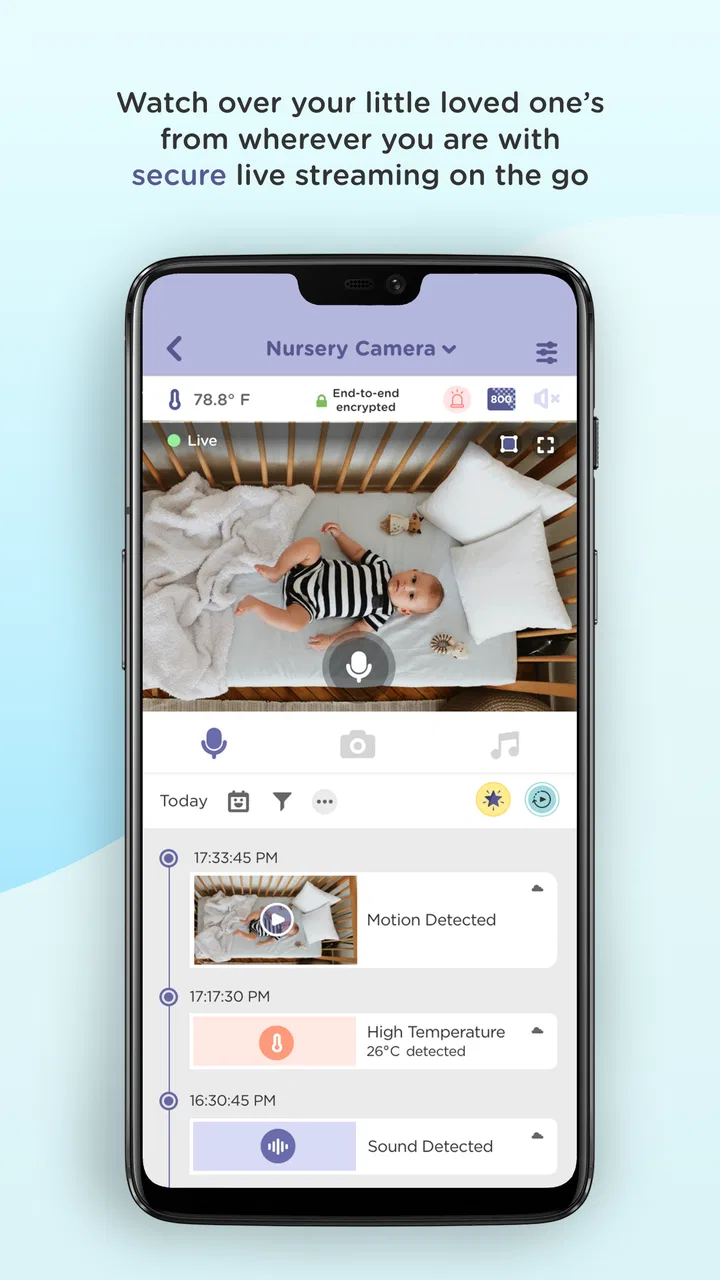
HubbleClub by Hubble Connected is a comprehensive app designed to enhance your experience with Hubble devices. It offers features like live video streaming, motion detection alerts, and two-way communication. Ideal for monitoring your home, pets, or nursery, the app integrates seamlessly with compatible cameras and smart devices.
02Is HubbleClub compatible with all devices?
HubbleClub is compatible with a wide range of Hubble Connected devices, including home security cameras and baby monitors. Before downloading the app, ensure that your device model supports the app's features by checking the compatibility list on the official website or app store description.
03What features does HubbleClub offer?
HubbleClub offers a range of features including live HD streaming, motion and sound detection alerts, video recording, and two-way audio. Users can also access a timeline of recorded events and customize alert settings to fit their preferences, ensuring a personalized monitoring experience.
04Is there a subscription fee for using HubbleClub?
While HubbleClub offers basic features for free, access to advanced functionalities such as cloud storage, advanced motion detection, and expanded recording capabilities may require a subscription. Pricing plans vary, and users can choose according to their needs. Always check the latest pricing details within the app.
05How secure is the HubbleClub app?
HubbleClub prioritizes user security with encrypted video feeds and secure cloud storage options. Regular updates ensure enhanced security measures are in place. Users are encouraged to use strong passwords and enable two-factor authentication for additional protection of their accounts and data.
Pros
- User-friendly interface for easy navigation.
- Seamless integration with Hubble devices.
- Customizable alerts and notifications.
- High-quality video streaming features.
- Supports multiple devices simultaneously.
Cons
- Occasional connectivity issues reported.
- Limited features in the free version.
- Heavy battery consumption on prolonged use.
- Requires strong Wi-Fi for optimal performance.
- Subscription needed for premium features.

HubbleClub By Hubble Connected
Gallery